You were up before dawn to catch first light over the garden. You carried the camera on your shoulder for six straight hours, caught the father's tear during his speech, and nailed the color on a reception lit entirely by candlelight. Then came weeks of editing, color grading, and a soundtrack chosen note by note. And after all that work, how do you hand the film over? If the answer is "a Google Drive link," you're throwing away the single most emotional moment of the whole process for the couple.
Delivery isn't the last box to tick on a project. It's the first time the couple sits down at home, no longer in the whirl of the day, and watches the memory of their wedding. That moment is part of your product just as much as the edit itself. Getting it right doesn't only move your clients more deeply, it also earns reviews, referrals, and a portfolio worth showing off. So let's look at how to raise your wedding video delivery to the same standard as the film inside it.
A Drive link quietly undercuts your authority
When you send a loose file over Drive or WeTransfer, the client experiences it the way they'd experience any random attachment. No context, no brand, no care. Worse still, generic services compress the video, take forever to load an 8 or 10 GB file, and force the couple to download the whole thing before they can watch a second of it. The excitement drains away somewhere inside the progress bar.
A professional filmmaker delivers in a professional environment. That's exactly what a purpose-built professional video hosting platform gives you: upload the master without re-compressing it, serve it at its true quality, and present it as what it is, a finished piece of work.
Build a gallery with your brand, not someone else's
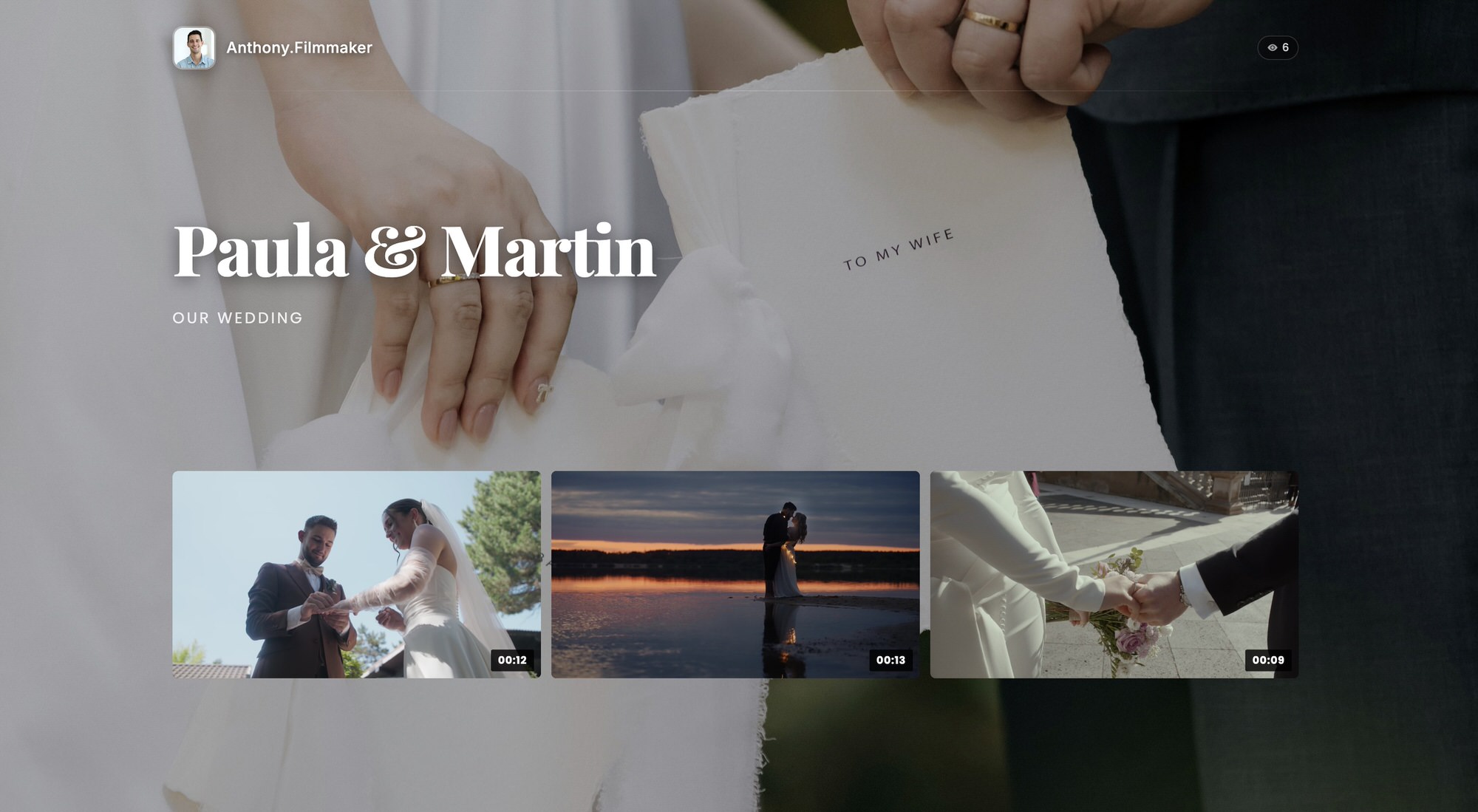
The first premium gesture is that, the moment the couple opens the link, they step into a space that is unmistakably yours. A portfolio with your own brand lets you shape the delivery page with your logo, your colors, and your typography, right down to your own domain. None of another tech company's interface, no "recommended videos," no thumbnails of strangers hijacking attention the moment the film ends.
Picture the difference. A couple opening the wedding of their dreams inside a page that breathes your visual identity reads a serious studio, one with taste and standards. It's the same feeling as a fine printed album versus an envelope of loose prints. And when the couple shares that link with their family, and they will, every visit becomes a calling card for your brand in front of dozens of future clients.
Order the delivery like a story
If you're handing over several pieces, the short trailer, the full film, maybe the complete ceremony, arrange them with intent. The two-minute trailer goes first: it's the emotional hook, the thing they'll forward to the family group chat that very night. Below it, the long-form film. Give each video a clear title and, for the finishing touch, a short thank-you note. You're building a journey, not dumping files.
Protect footage that is deeply personal
A wedding is personal content. It features children, family members, private moments, and sometimes speeches that no one outside the inner circle should ever see. Handing all of that over as a public link that Google can index is, simply put, unprofessional.
Set the delivery up as a private gallery protected with a password. Only the people you share the key with can reach the film. That gives you a double benefit: you signal genuine respect for your clients' privacy, and you show that you work to real security and compliance standards, with data hosted in the EU and full GDPR alignment, something a generic file-sharing service can't promise you. Couples feel it even when they can't name it technically: they sense their day is in safe hands.
Let them watch anywhere, without downloading a thing
Here's the technical detail that separates an amateur handoff from a professional one. The couple won't watch their wedding hunched over a laptop. They'll put it on the living-room TV on a Sunday, or show it to grandma from a phone after lunch. If doing that means downloading 10 GB and figuring out how to cast it to the TV, the magic breaks.
With adaptive HLS streaming, the film plays instantly, matching quality to each device's connection with no stalls and no endless buffering. You work in 4K, and that 4K arrives intact when the screen and the network allow it, while on a weaker connection the video steps down automatically so it never stutters. Served from a global CDN, playback is fast no matter who's watching or where they are. The result: the couple opens the link on the smart TV, the tablet, or the phone, and their wedding starts on its own, at the quality it deserves.
Offer downloads in full quality, when the time is right
Streaming is for enjoying; downloading is for keeping. Give the couple the option to grab the original file in full quality for their personal archive, to post to social, or simply to store somewhere safe. The key is that you control when and what can be downloaded: you can enable it after payment, or open up only the trailer for social and hold the full film back. That flexibility, always watchable, downloadable when appropriate, is precisely what a Drive link can't do.
Close the loop with data
When delivery lives on a serious platform, you also gain insight. Knowing the couple has watched the film three times, or that the trailer racked up forty plays in that first week, confirms that you moved them. Viewer analytics turn a blind handoff into a conversation: you know it landed, you know they loved it, and you have the perfect reason to ask for that review at the peak of emotion.
Delivery is your signature too
The edit wins hearts, but the delivery is what the client remembers when they describe what it was like to work with you. A branded gallery, protected as intimate footage should be, that plays on its own on any screen and in 4K, with quality downloads when the moment calls for it, says far more about your studio than a hundred words on your website. It's the difference between "they sent me a file" and "I lived my wedding all over again."
Stop delivering the work of your life through a dull link. Give every wedding the premium delivery it deserves.
Create your STRIMY account and deliver your next wedding like a professional.